Back office
QuickBooks & Your POS: What Integration Should Actually Do
“Integrates with QuickBooks” appears on half the POS brochures in Atlanta. The useful question is what syncs automatically, what you still export by hand, and whether processing fees land in the right account.
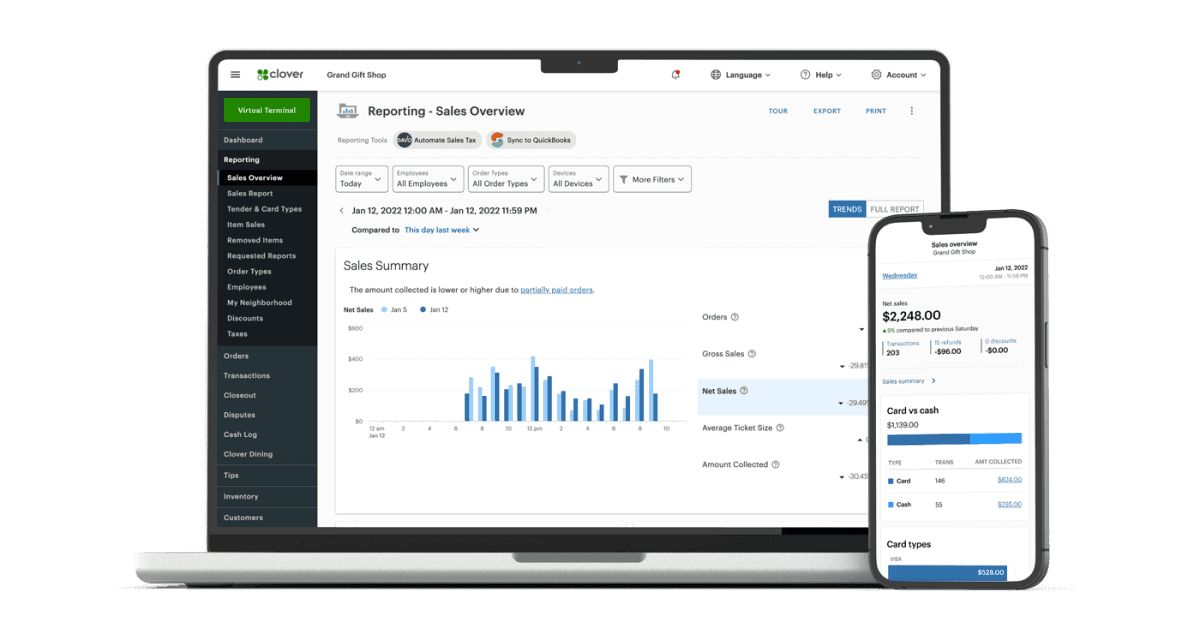
Strong integrations push daily sales summaries, tax splits, and tender types into QuickBooks without CSV gymnastics. Weaker ones dump a lump sum that your bookkeeper must decode. Ask for a demo using your actual tax setup and product categories.
What usually syncs well
- Daily sales totals by payment method.
- Sales tax collected by jurisdiction.
- Customer records for repeat buyers.
- Refunds and voids as offsetting entries.
Inventory depth varies. Retailers with variants and modifiers should verify SKU-level behavior, not assume it from a logo on the brochure.
Processing fees are separate
QuickBooks will not automatically explain interchange on your processing statement. Many owners map fees to a dedicated expense account monthly. Integration reduces sales-entry time; it does not replace statement review.
Questions before you commit
- Is the integration native, third-party, or an export template?
- What happens when internet drops—queue and retry or manual catch-up?
- Who supports sync errors: POS vendor, QuickBooks, or your processor?
- Does the integration require a specific gateway or merchant ID?
Omega Bank Card helps merchants choose POS and gateway paths that fit their accounting workflow, including QuickBooks-friendly options where available on supported platforms.
Buy integration for the reconciliation you hate doing at 9 p.m. on the last day of the month. A twenty-minute demo beats a year of manual journal entries.
Payment patterns unique to back office businesses
QuickBooks & Your POS: What Integration Should Actually Do is not generic retail. Ticket size, card-present mix, tipping, invoicing, keyed entry, and seasonal peaks create a fingerprint on your statement that bundled pricing rarely reflects fairly every month. Owners who measure only the quoted discount rate miss where those patterns become downgrades or premium interchange categories.
Segment your volume: counter vs mobile, weekday vs event, deposit vs balance-due. Each slice has a different effective cost once rewards cards and keyed entry enter the mix. Calculate effective rate on the whole month first, then isolate your busiest channel.
Omega Bank Card works with back office operators across Georgia and nationwide—pairing interchange-plus pricing with hardware that matches how staff actually checkout customers.
Hardware, workflows, and staff habits matter as much as rate
The right terminal or POS reduces friction and hidden fees. EMV dip and tap, offline policies, tip adjust, invoice deposits, and gift-card loads each change interchange qualification. Training staff once during onboarding is not enough—seasonal hires and busy rushes reintroduce keyed cards and late batches fast.
Explore POS platforms and mobile solutions that fit your floor plan. Integrations with scheduling, inventory, or practice management software should be tested on a real ticket path before go-live—not demo mode.
If you run compliant cash-discount or dual-pricing programs to offset processing, align signage and POS labels before marketing pushes a busy weekend. Cash discount vs dual pricing in Georgia explains customer-facing differences.
- Close batches on a schedule finance can audit—not "when someone remembers."
- Use recognizable statement descriptors tied to your public brand name.
- Review chargeback ratio quarterly; industry averages differ by MCC.
- Keep one processing contact for owners and one for managers.
Grow without pricing surprises
Adding locations, ecommerce, or mobile pay paths multiplies complexity. Decide early whether you need one merchant ID or many, and how reporting should roll up for your bookkeeper. One MID vs many outlines trade-offs multi-unit brands face.
See industry guide and related industry article for adjacent guidance. When volume justifies a deeper look, read your statement alongside a free Omega audit—we will map savings to your actual ticket habits, not a generic industry template.
Get started with transparent processing and POS options chosen for back office workflows—not a one-size-fits-all terminal shipped without setup context.
Common questions merchants ask about this topic
Merchants researching "QuickBooks & Your POS: What Integration Should Actually Do" usually want three answers: what will I actually pay after fees, what changes at the register, and what happens if something goes wrong with a chargeback or compliance notice. Those answers live on your statement and in your terminal settings—not in a generic rate quote.
Omega Bank Card recommends a quarterly fifteen-minute review: effective rate trend, new line items, batch closeout discipline, and whether your PCI attestation is current. Small fixes often beat processor churn. When churn does make sense, move with statement math and a documented migration checklist so deposits do not gap during the switch.
Still comparing options? Browse more articles on the Omega blog, explore credit card processing services, or request a free statement audit to ground the conversation in your real numbers.
- How do I calculate effective rate? Total fees ÷ card sales for the same period.
- When should I switch processors? When transparency or service blocks fixes—or savings clear your switching cost hurdle.
- Does Omega support my industry? We serve retail, restaurants, healthcare-adjacent, field service, ecommerce, and high-risk verticals with sponsor-bank fit reviewed up front.
- Where do I start? Get started or fee check with a recent PDF statement.
A sustainable review rhythm keeps costs predictable
One-time processor shopping fixes yesterday’s rate—not next quarter’s card mix. Set a recurring calendar reminder to export your statement PDF, recalculate effective rate, and note any new line items. Hidden fees often appear after promotional periods end, equipment leases begin, or PCI non-compliance triggers monthly penalties.
Pair financial review with operational review: Are managers batching terminals on schedule? Is keyed entry limited to true phone orders? Are ecommerce descriptors recognizable? Those habits affect back office businesses as much as basis-point negotiations—especially when rewards cards dominate weekend volume.
Omega Bank Card serves Atlanta-area merchants and businesses nationwide. Whether you need gateways for online sales, wireless terminals for field teams, or high-risk underwriting reviewed up front, anchor decisions in statement math—not slogans. Get started when you want a partner who documents recommendations in writing.
- Compare this month’s effective rate to the same month last year—not only to last month.
- Archive processor change letters; they explain new fees months later.
- Train seasonal staff on EMV and tap before peaks, not during them.
- Keep related blog guides bookmarked for your finance lead and floor manager.
Put the checklist to work this week
Knowledge only helps when it changes a habit or a contract term. Block thirty minutes with your manager or bookkeeper: pull last month’s statement, mark any line you cannot explain, and list checkout scenarios that still rely on keyed entry. That short exercise usually surfaces more savings than another round of generic rate quotes.
If this article overlaps with companion guide and follow-up read, read both before you call your processor—armed questions get clearer answers. Omega’s free statement audit is built for that conversation: we translate dense PDFs into decisions you can make without a payments engineering degree.
When you are ready to compare structured options—not just swap one teaser rate for another—contact Omega Bank Card. We will map quickbooks & your pos: what integration should actually do to the processing model, hardware, and compliance posture you actually run today.
Comments
Loading comments…
Related reads

POS strategy
Best POS Systems for Small Businesses in Atlanta
How to choose POS for an Atlanta small business: industry fit, payments integration, support, and hardware without chasing features you will not use.
Statements
How to Read a Merchant Processing Statement (Without the Headache)
Step-by-step guide to reading merchant processing statements: discount paid, interchange pass-through, fees, and the effective rate you actually pay.
Fee hunt
Hidden Fees on Processing Statements: What to Look For
Spot hidden credit card processing fees: PCI line items, batch and authorization charges, monthly minimums, and inflated downgrade buckets on your statement.
Want a second opinion on your statement?
We review what you pay today, line by line, and show how transparent pricing compares-no obligation to switch.
Get a Free Statement Audit